
Learning Vue, Part 1 - Getting Started
This is the first post in a 3-post series about my journey learning Vue.js just enough to build a minimal app from scratch.
I’ve always wanted to learn Vue.js, but didn’t really make time for it. The first time I heard about it was about 6-7 years ago. At that time, I was working on a complex WYSIWYG-type document editor, writing Angular on the frontend and Node.js on the backend.
Since then, Vue.js was marketed as a lightweight framework, that’s ready to be used without all the heavy setup of Angular. It was marketed as a better alternative to React as well.
A small disclaimer: I didn’t study in depth any new framework in the last 2-3 years, so these are just my opinions I got along the way. Take them with a pinch of salt. I’ll also make mistakes. Don’t say I didn’t warn you. Let’s keep going.
So, it’s lightweight, developer friendly, easy to learn, open-source: only good treats. I want to give it a try, and build a small little project from scratch.
Purpose
The main purpose is to learn Vue.js just enough to be able to put it into practice by building a simple web app. Not sure what application though, but we’ll figure it out along the way.
In order to achieve that, the following topics should be covered:
- understanding project structure
- basic features (rendering values, calling out functions)
- component creation and usage
- capturing user input through inputs and events
- build process
This isn’t an exhaustive list of topics, but at least I have a starting point.
Requirements
I’m following the official documentation (you can check it out here: https://vuejs.org/).
Vue.js is currently at version 3.
Based on the documentation, basic familiarity with HTML, CSS and JavaScript is required.
Some concepts
While reading the getting started, I noticed this:
Vue.js follows Single-File Components format. That means the same .vue file encapsulates JavaScript, HTML and CSS properties.
I know it’s a matter of taste, but I like having these things split into different files. That’s one reason I dislike React, and I liked Angular: having some sort of separation between functionality, template and styling.
Read more about it here: https://vuejs.org/guide/introduction.html#single-file-components
Let’s code
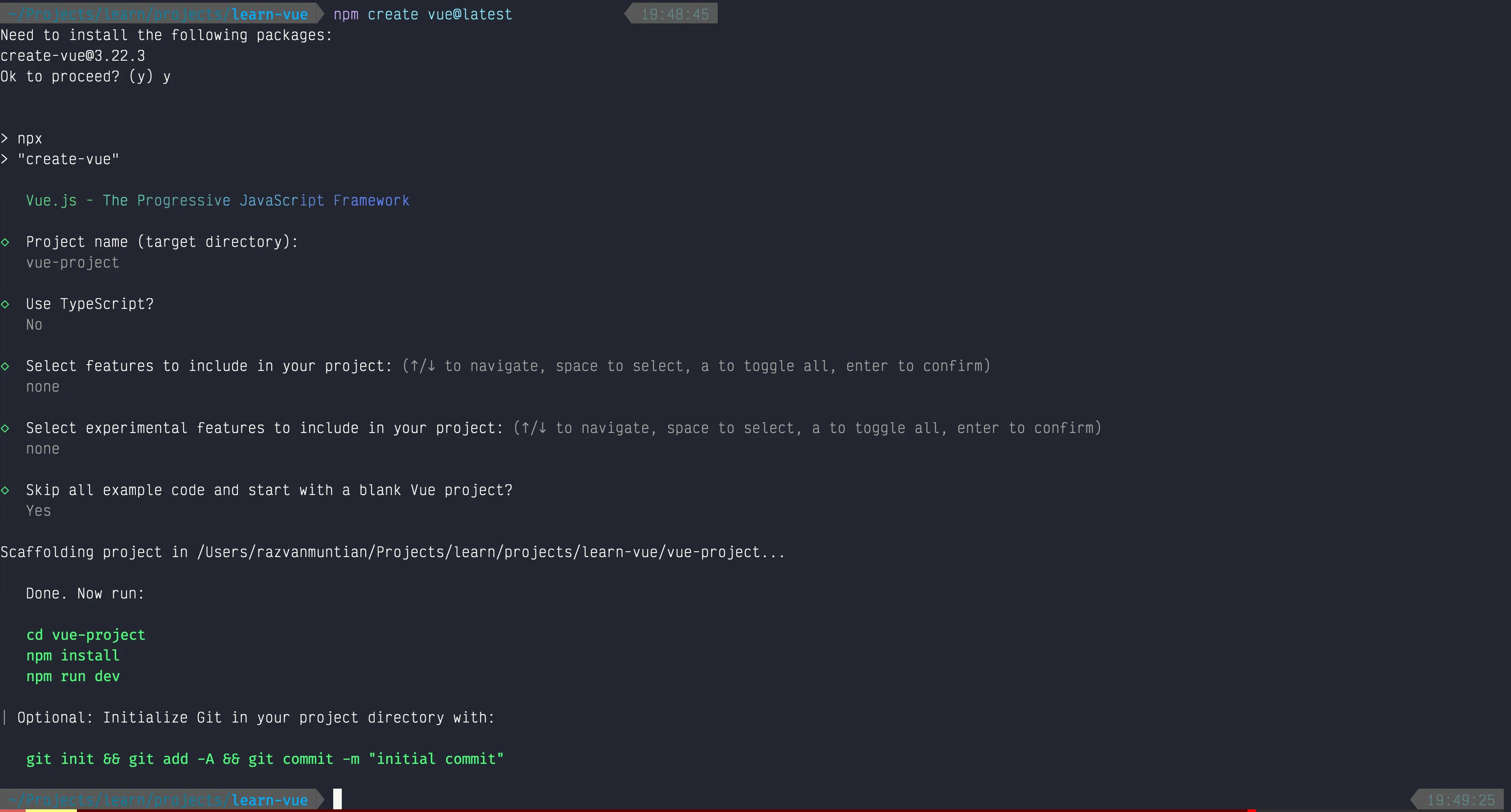
I want to create a minimal install, without testing, Typescript, JSX, or other fluff.
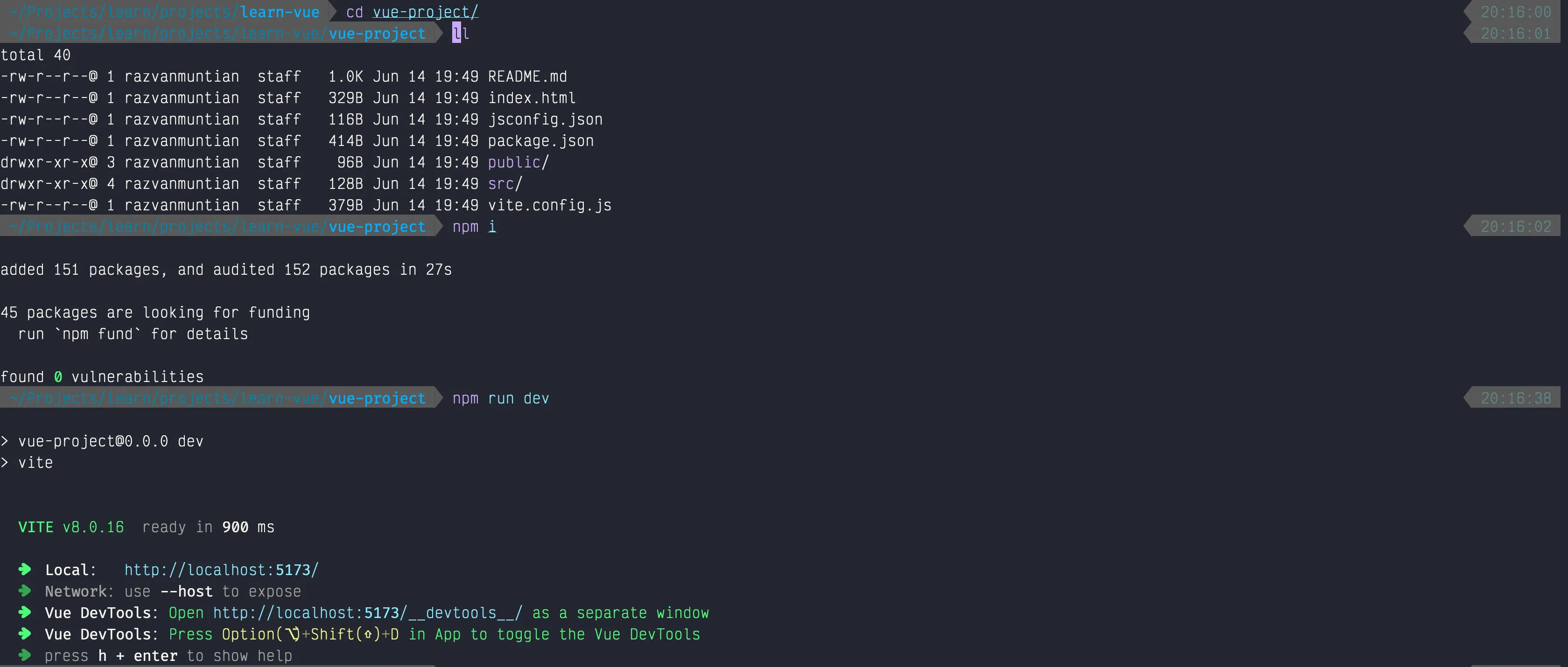
After running npm install and npm run dev, the app started on http://localhost:5173. We have a functional Vue app. Let’s look at the code for a bit.
Analysing the generated code
index.html
<!DOCTYPE html><html lang=""> <head> <meta charset="UTF-8"> <link rel="icon" href="/favicon.ico"> <meta name="viewport" content="width=device-width, initial-scale=1.0"> <title>Vite App</title> </head> <body> <div id="app"></div> <script type="module" src="/src/main.js"></script> </body></html>Two things to notice:
- the Vue app will be mounted on the div with id=
app - there’s a script that loads
/src/main.jswhich starts the app
main.js
import { createApp } from 'vue'import App from './App.vue'
createApp(App).mount('#app')
createApp is used to initialize the Vue app. That’s mounted then on the #app div. I read in the documentation that we can also have multiple Vue apps, not only a main one.
I guess it depends on the specs, but in some cases this might be very useful to separate the modules of a big app into smaller chunks.
App.vue
<script setup></script>
<template>  <h1>You did it!</h1>  <p>    Visit <a href="https://vuejs.org/" target="_blank" rel="noopener">vuejs.org</a> to read the    documentation  </p></template>
<style scoped></style>
This is the Vue specific file. As they specify in the documentation, we can see the script tag (that’ll contain the functionality), template (that’ll contain the HTML) and style (that’ll accommodate the CSS).
This is the entry point of the app.
So far, everything’s clear, but now I want to write some code, and I have no idea where to start. In the documentation the following chapters are about template syntax, reactivity, and so on. I’ll skip this part for now, because I want to learn how to create my own components first.
Creating a component
Follow along: https://vuejs.org/guide/components/registration.html
I found out how I can register a local component. I created one named Button that does nothing yet 🫠
<template> <button type="button">Click</button></template>I imported it App.vue by doing this:
<script setup>    import Button from './Button.vue'</script>
<template>  ....  <Button /></template>
<style scoped></style>
These are some questions I have until now:
- What I did is called Local Registration, meaning the component is directly defined in relation to the parent component. There’s also Global Registration. I wonder when is it the best to use one over the other.
- Whenever we use the
setupattribute, that means we use Composition API to define a component. What’s the difference between Options API and Composition API, and when we should use one over the other? - Besides a simple way of defining the components and attributes, I think there’s much more about Composition API vs Options API. There are different examples in the documentation for these 2 APIs. Why?
Adding some more code
For now I’ll stick with the Composition API, which, in terms of syntax, the Composition API is pretty similar to React. This is what I found out:
There’s the concept of ref. From my understanding, a ref is an object that holds the value we want, and whenever that gets changed, Vue automatically gets notified of the change and updates the DOM accordingly.
Read more here: https://vuejs.org/guide/essentials/reactivity-fundamentals.html#why-refs
So, if we were to create a ref and add functions to our new component, this is what we have:
<script setup>    import { ref } from 'vue'    const count = ref(0)
    function increment() {        count.value++;    }
    function decrement() {        if (count.value > 0) {            count.value--;        }    }</script>
<template>    <button type="button" @click="increment">Click +</button>    <button type="button" @click="decrement">Click -</button>    <p>Count: {{count}}</p></template>
And this is how the app looks like (keep in mind that the Button component is rendered within the App component):

Recap
So let’s recap: these are the goals, and let’s see what we did:
- ✅ Understanding project structure - I got a basic understanding of how things work, but I’m pretty sure there’s more to this. For our purpose, I think I can mark it as done.
- Basic features (rendering values, calling out functions) - Same here: I still think I’m missing some aspects here, so I won’t check this for now.
- Component creation and usage - We created a new component, but there’s still more to read about this topic.
- Capturing user input - We captured the click, but there’s much more to this. It’s a good start though.
- Build process - We didn’t touch this one yet. Maybe in the next session.
Thank you for reading, and I hope this encouraged you to join me and learn Vue.js as well!
